
Login

Register

Automate Your Application with

Email Event Web-hooks

Start with Email API

Get the Guide →
An illustrative sketch of a flower

The Problem

What happens after the email is sent?

Many applications rely on email to communicate with users, whether it's onboarding,

notifications, invoices, or transactional messages.


However, most systems struggle to answer a simple question:

What happens after the email is sent?


Without an event-based system, teams face several limitations:

No Real-Time Visibility


Developers and product teams cannot easily track whether an email was opened, clicked, or delivered. This makes it difficult to measure engagement or understand if users are actually interacting with your emails.

  • Missed Automation Opportunities

    Without real-time email events, applications cannot trigger workflows based on user engagement.


    For example:

    activating onboarding flows

    updating user life-cycle status

    triggering follow-up notifications


    These missed opportunities lead to slower product adoption and weaker customer engagement.

  • Manual Data Synchronization

    When email engagement data is not automatically synced, teams must manually update systems such as CRM platforms, analytics tools, or internal dashboards.


    This creates operational friction and delays insights.

The Solution: Mailtarget Email Webhooks

Mailtarget Webhooks allow your application to receive real-time event notifications whenever email activity occurs.


Instead of polling the API for updates, Mailtarget sends an HTTP POST request to your web-hook endpoint containing the event data. Your application can then process the event and trigger automated workflows instantly.

Supported email activity events include:

Event

injection

Email has been successfully relayed to Mailtarget

delivery

Email has been sent to the recipient's email server

open

Recipient opened the email

click

Recipient clicked a link

delay

Temporary delivery issue

bounce

Email delivery failed

Real Use Case Examples

Below are some common ways teams use Mailtarget Webhooks in production systems.

Update User Activity

When Email Is Opened

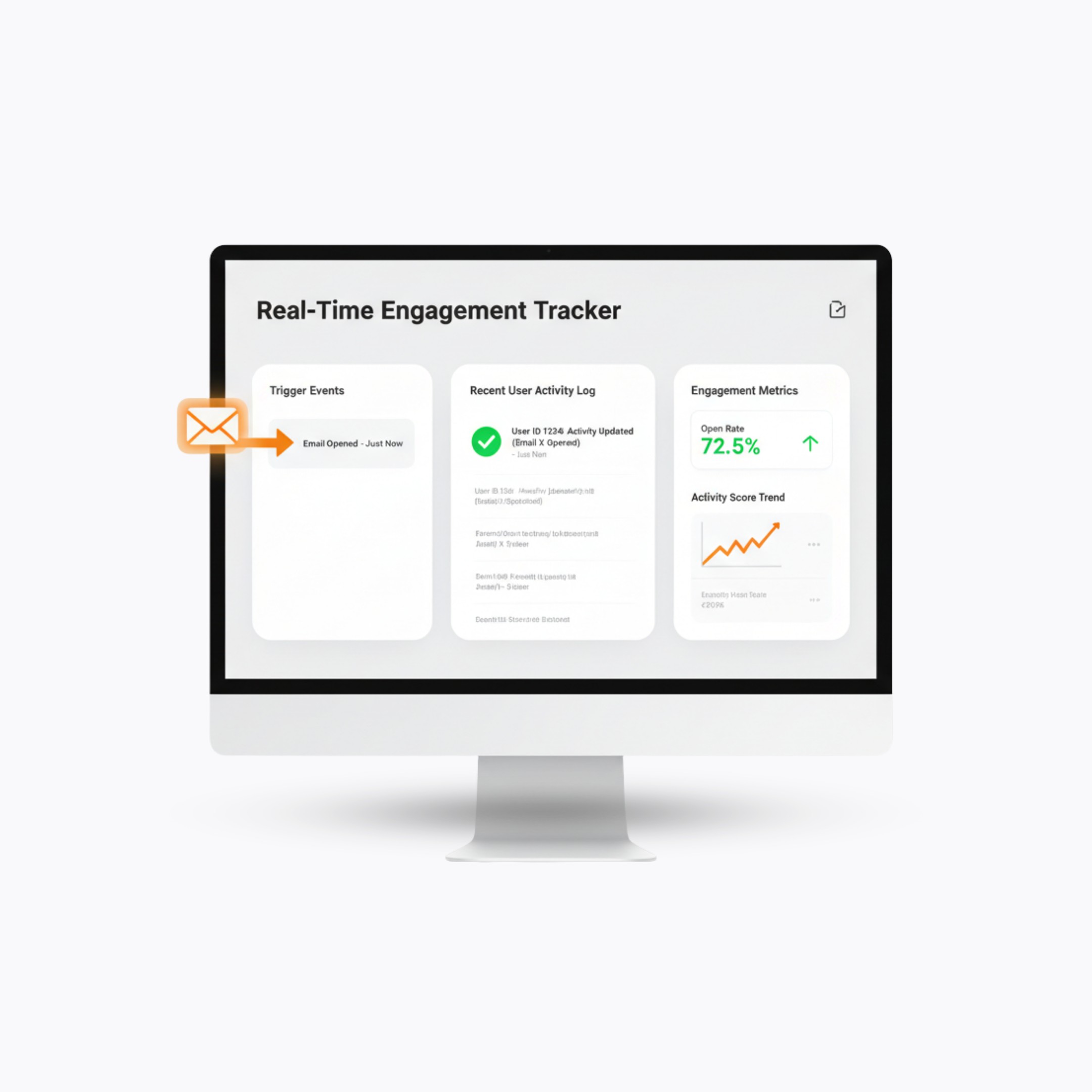
When a user opens a product email, that interaction can be used as a strong signal of engagement.


Your system can automatically:

Mark the user as active

Trigger onboarding workflows

Update CRM activity logs

Increase engagement scoring

This allows product teams to track real user behavior instead of relying only on email delivery metrics.

Trigger Product Workflows

When Users Click a Link

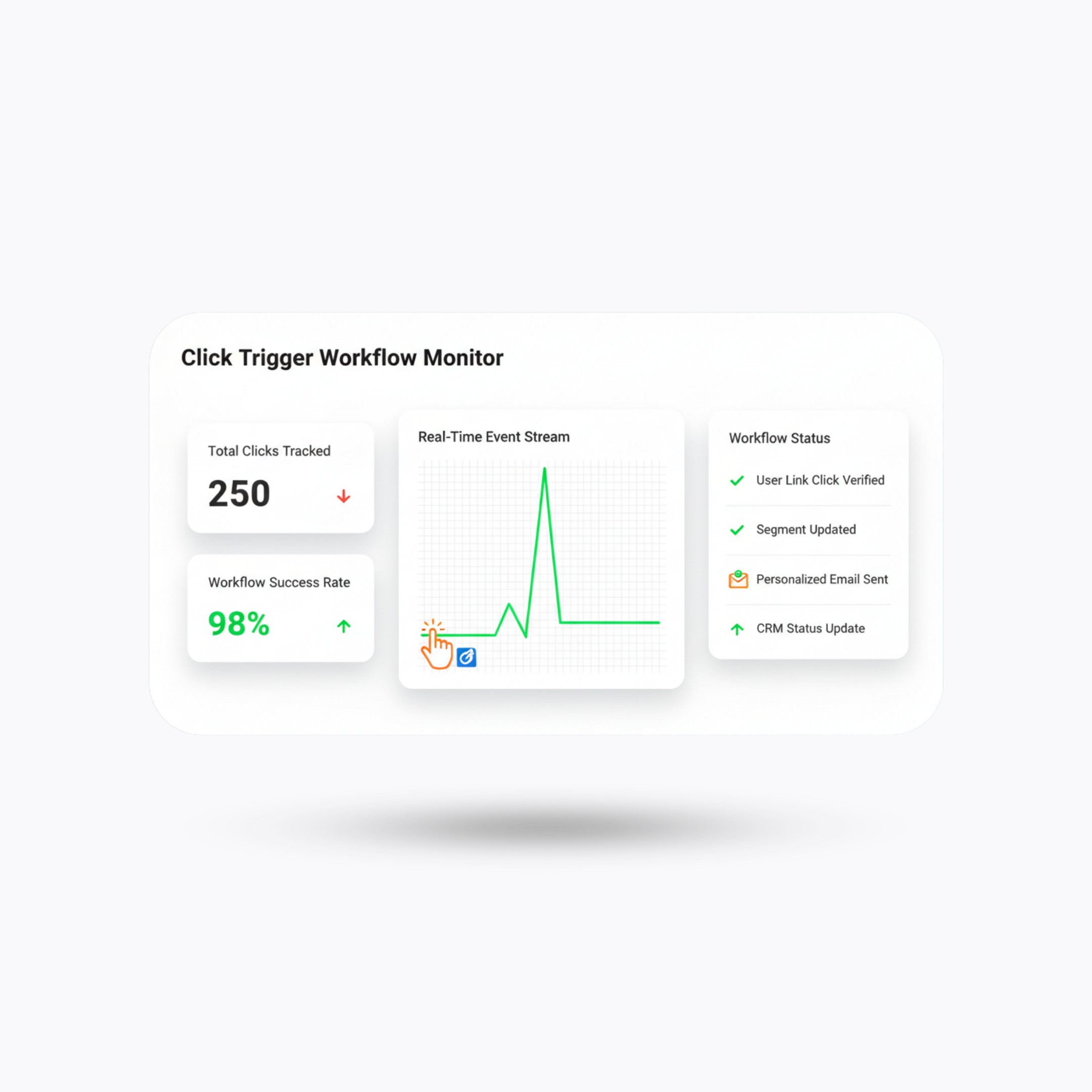
A link click often indicates intent. For example, if a user clicks a pricing page link inside an email campaign,


your system could:

Trigger a sales notification

Assign the user to a sales pipeline

Send a follow-up email

Unlock specific features in

the product

This creates event-driven automation based on real customer intent.
Automatically Handle

Delivery Failures

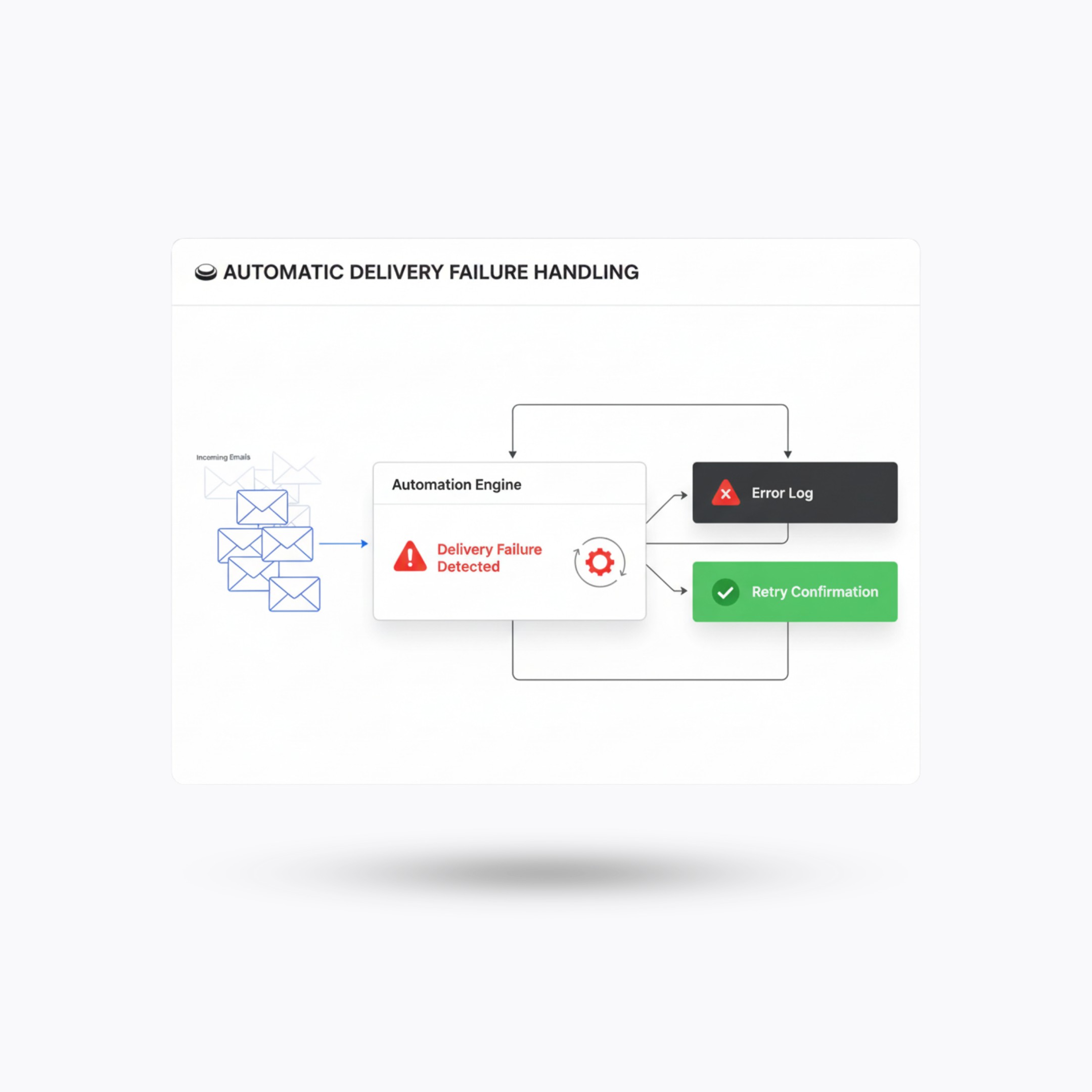
Email bounces can harm sender reputation if not handled properly. Using webhook events, your system can automatically:

Flag invalid email addresses

Remove recipients from mailing lists

Update customer records prevent repeated sending

to unreachable addresses

Unlock specific features in

the product

This creates event-driven automation based on real customer intent.
How Mailtarget Webhooks Work

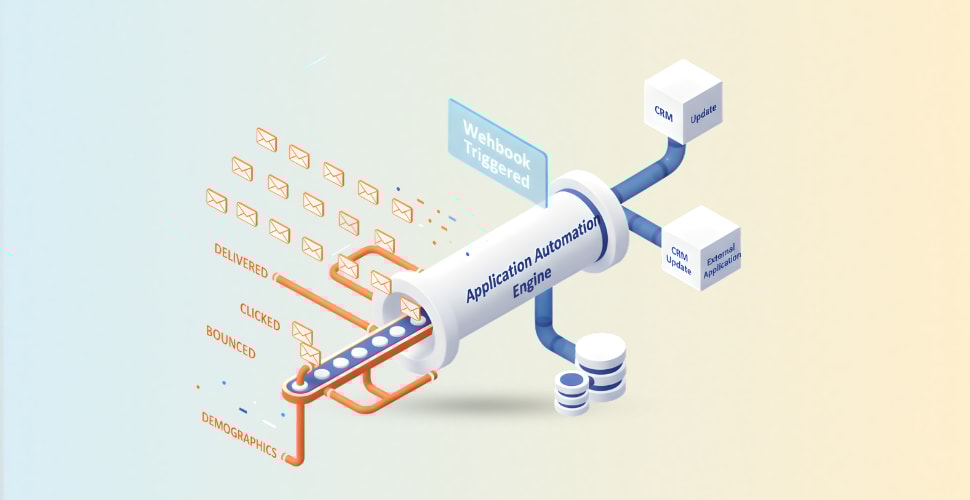
Mailtarget Webhooks follow an event-driven architecture.
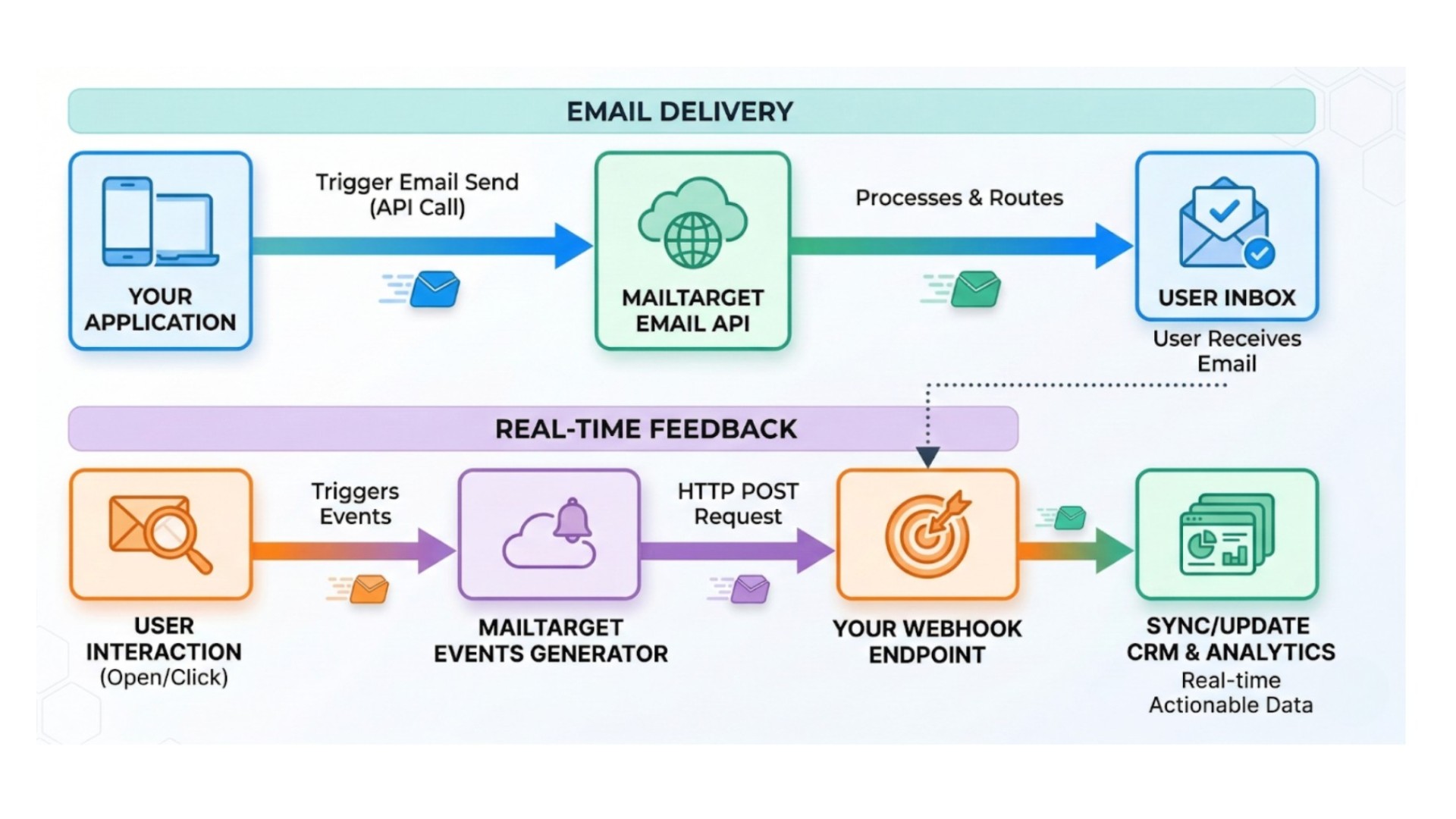
This architecture allows your system to respond instantly

whenever email activity occurs.

Get the Email Webhooks Integration Guide

Learn how to receive real-time email events and build event-driven workflows inside your application.

Build Event-Driven Email Automation

Email engagement data should not stay inside your email platform.


With Mailtarget Webhooks, you can bring those events directly into your application and turn them into automation, insights, and smarter product experiences.

Start Building with Mailtarget Webhooks

Webhook Documentation

Start With Email API

Products

Email API

Email Marketing

Solutions

For Developers

For Marketers

Resources

Guides

Case Studies

Blog

Pricing

Company

About

System Status

Terms & Conditions

Privacy Policy

Use Cases

Event Web-hooks

Login

Register

Automate Your Application with

Email Event Web-hooks

Start with Email API

Get the Guide →

An illustrative sketch of a flower

The Problem

What happens after the email is sent?

Many applications rely on email to communicate with users, whether it's onboarding,

notifications, invoices, or transactional messages.


However, most systems struggle to answer a simple question:

What happens after the email is sent?


Without an event-based system, teams face several limitations:

No Real-Time Visibility


Developers and product teams cannot easily track whether an email was opened, clicked, or delivered. This makes it difficult to measure engagement or understand if users are actually interacting with your emails.

  • Missed Automation Opportunities

    Without real-time email events, applications cannot trigger workflows based on user engagement.


    For example:

    activating onboarding flows

    updating user life-cycle status

    triggering follow-up notifications


    These missed opportunities lead to slower product adoption and weaker customer engagement.

  • Manual Data Synchronization

    When email engagement data is not automatically synced, teams must manually update systems such as CRM platforms, analytics tools, or internal dashboards.


    This creates operational friction and delays insights.

The Solution: Mailtarget Email Webhooks

Mailtarget Webhooks allow your application to receive real-time event notifications whenever email activity occurs.


Instead of polling the API for updates, Mailtarget sends an HTTP POST request to your web-hook endpoint containing the event data. Your application can then process the event and trigger automated workflows instantly.

Supported email activity events include:

Event

Description

injection

Email has been successfully relayed to Mailtarget

delivery

Email has been sent to the recipient's email server

open

Recipient opened the email

click

Recipient clicked a link

delay

Temporary delivery issue

bounce

Email delivery failed

Real Use Case Examples

Below are some common ways teams use Mailtarget Webhooks in production systems.

Update User Activity

When Email Is Opened

When a user opens a product email, that interaction can be used as a strong signal of engagement.


Your system can automatically:

Mark the user as active

Trigger onboarding workflows

Update CRM activity logs

Increase engagement scoring

This allows product teams to track real user behavior instead of relying only on email delivery metrics.

Trigger Product Workflows

When Users Click a Link

A link click often indicates intent. For example, if a user clicks a pricing page link inside an email campaign,


your system could:

Trigger a sales notification

Assign the user to a sales pipeline

Send a follow-up email

Unlock specific features in the product

This creates event-driven automation based on real customer intent.

Automatically Handle

Delivery Failures

Email bounces can harm sender reputation if not handled properly. Using webhook events, your system can automatically:

Flag invalid email addresses

Remove recipients from mailing lists

Update customer records prevent repeated sending

to unreachable addresses

This helps maintain clean contact databases and better deliverability.

How Mailtarget Webhooks Work

Mailtarget Webhooks follow an event-driven architecture.

This architecture allows your system to respond instantly

whenever email activity occurs.

Get the Email Webhooks Integration Guide

Learn how to receive real-time email events and build event-driven workflows inside your application.

Build Event-Driven Email Automation

Email engagement data should not stay inside your email platform.


With Mailtarget Webhooks, you can bring those events directly into your application and turn them into automation, insights, and smarter product experiences.

Start Building with Mailtarget Webhooks

Webhook Documentation

Start With Email API

Products

Email API

Email Marketing

Solutions

For Developers

For Marketers

Resources

Guides

Case Studies

Blog

Pricing

Company

About

System Status

Terms & Conditions

Privacy Policy

Use Cases

Event Web-hooks

Login

Register

Automate Your Application with

Email Event Web-hooks

Start with Email API

Get the Guide →

An illustrative sketch of a flower
  • Missed Automation Opportunities

    Without real-time email events, applications cannot trigger workflows based on user engagement.


    For example:

    activating onboarding flows

    updating user life-cycle status

    triggering follow-up notifications


    These missed opportunities lead to slower product adoption and weaker customer engagement.

  • Manual Data Synchronization

    When email engagement data is not automatically synced, teams must manually update systems such as CRM platforms, analytics tools, or internal dashboards.


    This creates operational friction and delays insights.

The Solution: Mailtarget Email Webhooks

Mailtarget Webhooks allow your application to receive real-time event notifications whenever email activity occurs.


Instead of polling the API for updates, Mailtarget sends an HTTP POST request to your web-hook endpoint containing the event data. Your application can then process the event and trigger automated workflows instantly.

Supported email activity events include:

Event

Description

injection

Email has been successfully relayed to Mailtarget

delivery

Email has been sent to the recipient's email server

open

Recipient opened the email

click

Recipient clicked a link

delay

Temporary delivery issue

bounce

Email delivery failed

Real Use Case Examples

Below are some common ways teams use Mailtarget Webhooks in production systems.

Update User Activity

When Email Is Opened

When a user opens a product email, that interaction can be used as a strong signal of engagement.


Your system can automatically:

Mark the user as active

Trigger onboarding workflows

Update CRM activity logs

Increase engagement scoring

This allows product teams to track real user behavior instead of relying only on email delivery metrics.

Trigger Product Workflows

When Users Click a Link

A link click often indicates intent. For example, if a user clicks a pricing page link inside an email campaign,


your system could:

Trigger a sales notification

Assign the user to a sales pipeline

Send a follow-up email

Unlock specific features in the product

This creates event-driven automation based on real customer intent.

Automatically Handle

Delivery Failures

Email bounces can harm sender reputation if not handled properly. Using webhook events, your system can automatically:

Flag invalid email addresses

Remove recipients from mailing lists

Update customer records prevent repeated sending

to unreachable addresses

This helps maintain clean contact databases and better deliverability.

How Mailtarget Webhooks Work

Mailtarget Webhooks follow an event-driven architecture.

This architecture allows your system to respond instantly

whenever email activity occurs.

Get the Email Webhooks Integration Guide

Learn how to receive real-time email events and build event-driven workflows inside your application.

Build Event-Driven Email Automation

Email engagement data should not stay inside your email platform.


With Mailtarget Webhooks, you can bring those events directly into your application and turn them into automation, insights, and smarter product experiences.

Start Building with Mailtarget Webhooks

Webhook Documentation

Start With Email API

Products

Email API

Email Marketing

Solutions

For Developers

For Marketers

Resources

Guides

Case Studies

Blog

Pricing

Company

About

System Status

Terms & Conditions

Privacy Policy